Integrating OpenRouter into Live Helper Chat with Responses API and Tool Calls support
Live Helper Chat is the agent harness here - it keeps the conversation, the triggers, the tools (actions) and the state - while OpenRouter routes the request to the model that drives the agent.
OpenRouter is a unified API gateway that gives you access to hundreds of AI models — including OpenAI, Anthropic Claude, Google Gemini, Meta Llama, and many others — through a single OpenAI-compatible endpoint.
Before you begin, you will need:
- An API Key from https://openrouter.ai/keys
- A configured REST API in Live Helper Chat
- A configured Bot in LHC
OpenRouter uses an OpenAI-compatible Responses API (/api/v1/responses). The LHC configuration files below are nearly identical to the ChatGPT Responses API integration — the only differences are the host (https://openrouter.ai) and the model name.
Files support
- In files configuration make sure
Show file preview before uploading fileis activated - Files upload is activated for the users
- You can modify default query if image is uploaded without user question
Streaming vs Non-Streaming
Choose the variant that fits your infrastructure:
| Variant | Requires |
|---|---|
| Non-Streaming | PHP only |
| Streaming | PHP + NodeJS + PHP-Resque extensions |
Flow with Tool Call Support
The examples below include two sample tool-call functions (password_reminder and support_price) to demonstrate how function calling works end-to-end.
REST API
- Import one of the REST API configurations:
- Set the
Bearertoken value to your OpenRouter API key (YOUR_API_KEY). - Change the
modelfield in the request body to the model you want to use, for exampleopenai/gpt-4o,anthropic/claude-3.5-sonnet,google/gemini-2.0-flashetc. See the full list at https://openrouter.ai/models. - Adjust the
systemmessagecontentto match your use case. - Optionally replace
YOUR_VECTOR_STORAGE_IDwith your OpenAI vector store ID if you want file search. Remove thefile_searchtool entry if you don't need it. - After testing you may want to uncheck
Log all request and their responses as system messages. - If responses take a long time, increase
Maximum execution time.
Request body overview
The request body sent to OpenRouter looks like this (simplified):
{
    "model": "openai/gpt-4o",
    "stream": false,
    "parallel_tool_calls": false,
    "input": [
      {
        "role": "system",
        "content": "You are a helpful assistant..."
      }
    ],
    "tools": [
        {
            "type": "file_search",
            "vector_store_ids": ["<YOUR_VECTOR_STORAGE_ID>"]
        },
        {
            "type": "function",
            "name": "password_reminder",
            "description": "Sends a password reset link to the provided email address.",
            "parameters": {
                "type": "object",
                "properties": {
                    "email": {
                        "type": "string",
                        "description": "The email address associated with the account."
                    }
                },
                "required": ["email"]
            }
        },
        {
            "type": "function",
            "name": "support_price",
            "description": "Returns paid support price",
            "parameters": {
                "type": "object",
                "properties": {},
                "required": []
            }
        }
    ]
}
Set "stream": true when using the streaming REST API import.
Bot
- Import one of the bot configurations:
- During the import wizard, select the REST API you just imported.
Calling a trigger based on a defined function
This is how you would wire up the transfer_operator scenario (the same pattern applies to any tool call).
- Define the function in the REST API request body:
{
  "type": "function",
  "name": "transfer_operator",
  "description": "Transfers to a human agent if the user explicitly asks for one or the bot cannot resolve the issue.",
  "parameters": {
    "type": "object",
    "properties": {},
    "required": []
  }
}
You can also add a hint to your system prompt:
Always call transfer_operator function if (and only if) you are explicitly asked for a human (or agent) OR if you cannot help the user with a specific task.
- Add an event to the relevant trigger in your bot:
- Type:
Custom text matching - Should include any of these words:
transfer_operator
- Type:
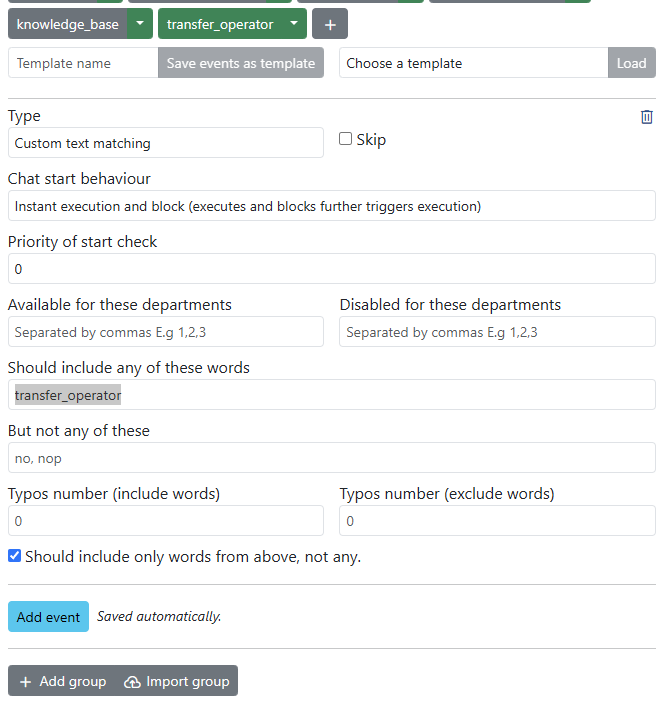
Limiting the knowledge base to uploaded documents (Vector Storage)
Here are example system instructions for a documentation bot:
You are a helpful Live Helper Chat Bot. You answer questions based on file search. If you don't know the answer, respond with "I can only help with Live Helper Chat related questions." Provide the most relevant answer to the visitor's question, not exceeding 100 words. Include a link for more information about your answer.
Choosing a model
OpenRouter supports a large number of models. Change the model field in the REST API request body to switch models without any other changes. Some popular options:
| Provider | Model identifier |
|---|---|
| OpenAI | openai/gpt-4o |
| OpenAI | openai/gpt-4.1 |
| Anthropic | anthropic/claude-3.5-sonnet |
| Anthropic | anthropic/claude-3.7-sonnet |
google/gemini-2.0-flash | |
| Meta | meta-llama/llama-3.3-70b-instruct |
| DeepSeek | deepseek/deepseek-chat |
See the full model list at https://openrouter.ai/models.
Debugging
For debug purposes, edit the REST API in the back office and check Log all request and their responses as system messages. This will display the raw API request and response as system messages in the chat, which makes it easy to diagnose unexpected outputs or failed tool calls.