Completions generic api integration
Live Helper Chat is the agent harness - it keeps the conversation, the triggers, the tools (actions) and the state - while the completions server supplies the model that drives the agent. Any service exposing an OpenAI compatible completions API can be used as the model provider.
This integration was tested with https://github.com/ggml-org/llama.cpp.
During testing I ran on an NVIDIA Tesla P4 using the following command:
./llama.cpp/build/bin/llama-server \
    -m Qwen3.5-4B-Q4_K_M.gguf \
    --mmproj mmproj-F16.gguf \
    --host 0.0.0.0 \
    --port 8080 \
    --api-key "your-api-key" \
    -ngl 99 \
    -fa on \
    -t 8 \
    -c 16384 \
    -b 512 \
    -ub 512 \
    --mlock \
    --reasoning-budget 512 \
    --jinja \
    --cache-type-k q8_0 \
    --cache-type-v q8_0
This integration uses the Chat Completions API.
REST API
- Non-streaming REST API: rest.json
- Streaming REST API: rest-stream.json
Bot
- Non-streaming Bot: bot.json
- Streaming Bot: bot-stream.json
Flow with Tool Call Support
The main difference from the legacy flow is support for tool calls (functions).
REST API
- Set a
Bearertoken. - Modify the
systemprompt to suit your knowledge-limiting needs.
Bot
- Import a bot and configure triggers and API calls as shown in the video.
Calling a Trigger Based on a Defined Function
- Identify the function name defined in the model (example:
transfer_operator). - Add an event to your trigger with
Type=Custom text matchingandShould include any of these words=transfer_operator.
For example: 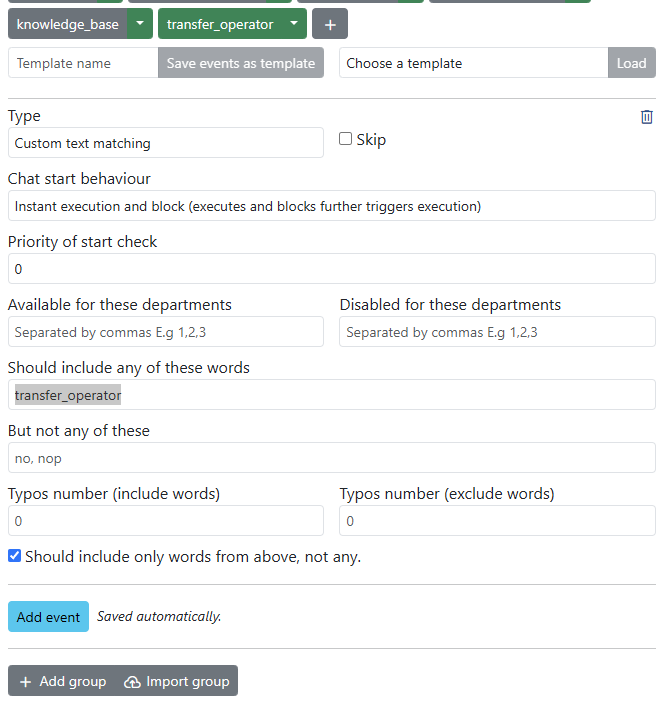
Limiting the Knowledge Base to Uploaded Documents
Example System instructions used for the documentation bot:
You are a helpful Live Helper Chat Bot. Answer questions using file search only. If you don't know the answer, respond with "I can only help with Live Helper Chat related questions." Keep answers under 100 words and include a link for more information.